If you own Axies, you can join a hosted plot without buying land. The host shares the rewards earned by your Axies. The separate Free Plot lets you try the basics without earning rewards.
Connect a wallet on the official browser version. Choose a Free Plot to learn the controls. If you own Axies and want to place them on another player’s land, open Find a Plot from the home screen.
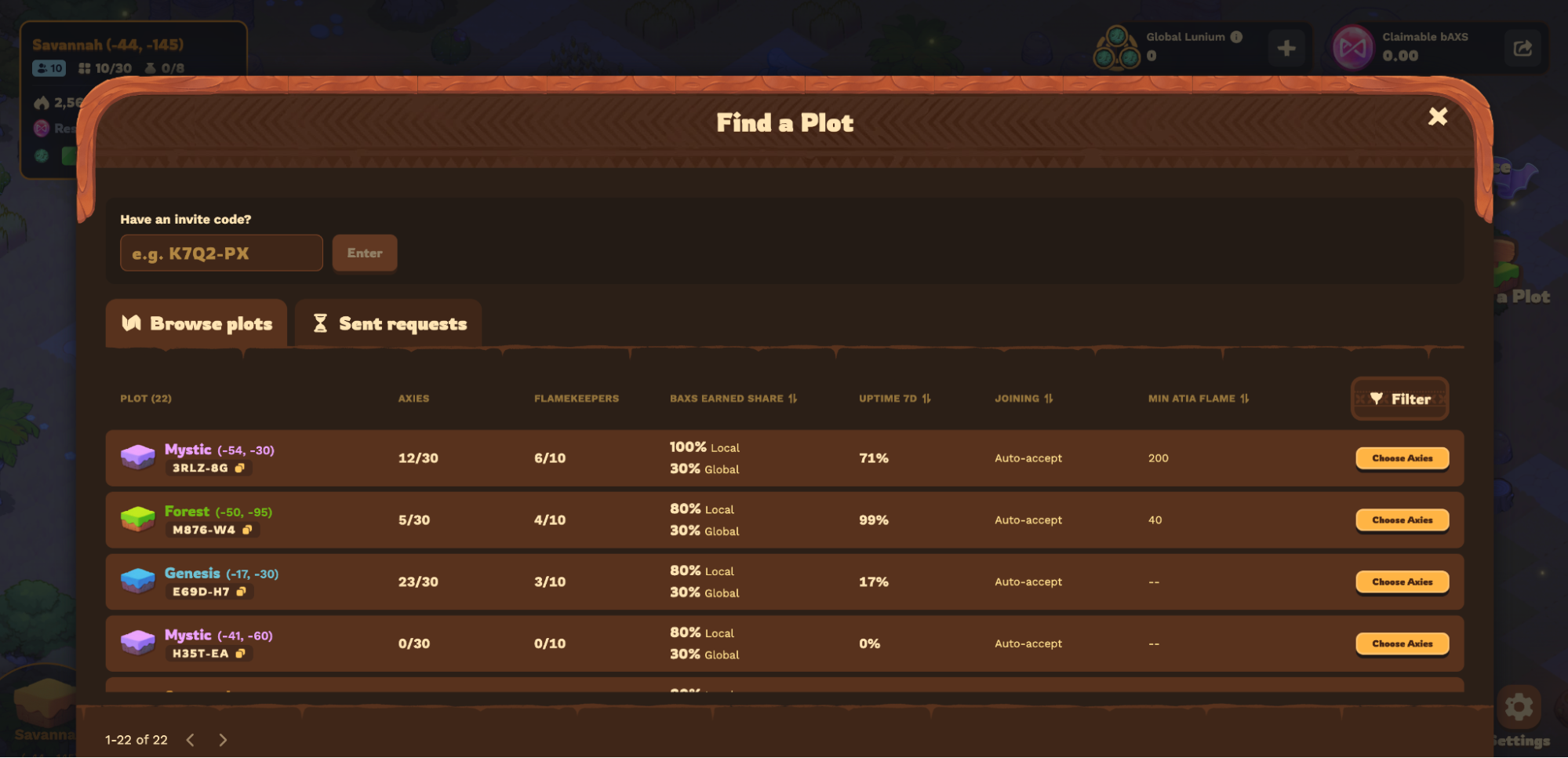
A hosted-plot search screen shown in the development report. Image source
Read both the Local and Global shares
The share can change depending on which type of Lunium the plot consumes, even under the same invite. If the invite has a minimum Atia’s Flame, every selected Axie must qualify.
The percentage applies to the share earned by your own Axies, after their Flame contribution is calculated.
Official reward example
Your Axies’ contribution
In the official example, your Axies provide 50 of the plot’s 150 Flame. Their share of the 75 bAXS reward is 25 bAXS.
The invite split
If this tick uses Local Lunium and your invite assigns you 80%, you receive 20 bAXS (25 × 80%). Actual rewards vary per tick.
Auto-accept lets you join on submission. With manual approval, wait for the landowner. Each Axie can work on one plot at a time, so pick different Axies for another plot.
Your Axies start contributing at the next hourly reward tick. Open the plot you joined in Town Registry to see their rewards by tick. Your share goes to your claimable balance.
A guide based on official sources. We have not installed, signed in or played. · As of 2026-10-16
Game update
Hosted Plots open a route without owning Land
On November 12, Hosted Plots opened a way for Land Owners to host Flamekeepers' Axies. Both Sky Mavis's blog and its Discord announcement confirmed the launch.
Publisher gameplay image A hosted-plot search screen shown in the development report. Image source ↗
How it plays and what changed
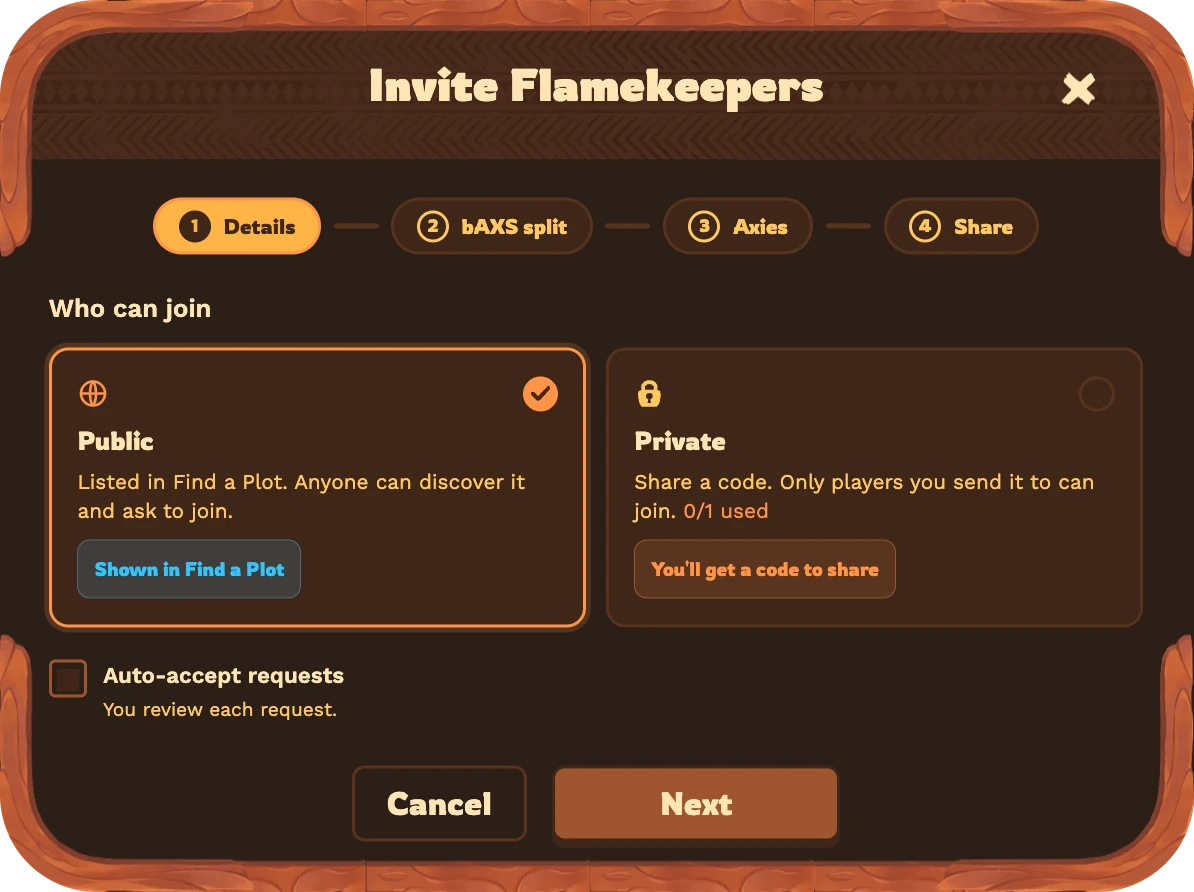
Find a Plot lists public offers. Private offers use a code. The owner sets a separate reward share for Local and Global Lunium, and bAXS is split on each tick.
Access and eligibility
Flamekeepers pay no hosting fee but need suitable Axies. Check both percentages and the minimum Atia’s Flame on the offer.
Terrariums is a browser experience for assigning axies to plots and managing training or prayer through hourly progress. It differs from direct-control Atia’s Legacy: collection placement and Lunium use are central. Training at the Dojo develops AXP, while prayer at the Atia Shrine contributes Flame. An axie cannot do both simultaneously, and NFT-land reward shares depend on other participants in the same environment.
Connect a wallet and identify a Free Plot or owned land.
Set up plots and axies in the Registry, and review active-NFT locks.
Choose training or prayer, then inspect Lunium and the next tick.
Reconsider placement, equipment and environment, or deactivate when needed.
Place Axies in a plot and distinguish AXP training in the Dojo from Flame in the Shrine. Land, hosted plots, Lunium and the treatment of placed assets have separate conditions.
Training and prayer are mutually exclusive activities for an axie. Decide whether development or prayer is the goal before changing assignments. Active Registry status and transfer restrictions differ from merely owning an asset.
In Hosted Plots, a landowner supplies an activated plot and Lunium while participating Flamekeepers bring their own Axies. The operator announced the feature live on November 12, 2026. The announcement says Flamekeepers pay nothing to join, but they must bring Axies; it does not mean acquiring those Axies is free. The owner may also place their own Axies on the plot.
Your share applies to your contribution, not the whole plot
Each hourly tick first allocates the plot’s reward by each participant’s share of its Atia’s Flame, then applies the invite percentage to the Flamekeeper’s allocation. In the official hypothetical example, a 75 bAXS plot reward, 100 owner Flame, 50 guest Flame and an 80% guest share yield 20 bAXS for the guest—80% of their 25 bAXS allocation—and 55 for the owner. This illustrates the calculation; actual rewards vary by tick.
Public listings, invite codes and checks before joining
Image: the official Axie Infinity Hosted Plots launch article; the interface is shown as published.
Browse public listings through Find a Plot or enter a code for a private invite. Check any minimum Flame per Axie; Axies start contributing from the next tick after joining. A plot holds up to 30 Axies across owner and guests, and each Axie can work only one plot at a time. Flamekeepers may leave whenever they choose. These steps come from the official guide, not a hands-on verification of entry or reward receipt.
Each invitation sets separate Local and Global Lunium shares; the fuel used in a tick determines the applicable rate. Local Lunium regenerates on the plot for free, while the Land Owner buys Global Lunium. An invitation may accept applications automatically or require manual approval. Revoking an invite stops new participants, while existing participants keep their original terms. Changed shares apply to later joiners, so check both rates, the minimum Flame per axie and the approval method before applying. The November 12 launch announcement says the percentage ranges in the November 9 preview were removed at launch. Check the current terms on each owner’s invitation.
An Estate requires matching environments, the same account and edge adjacency. Corners and mixed environments do not qualify. The boost targets one highest-Flame plot, so distinguish the connected group from its beneficiary.
For three plots in a line, removing the end differs from removing the middle. Documented deactivation requirements should be read alongside their effect on connectivity; this is a configuration example, not a recommendation to trade.
[1] · [2] · [4] · [3]Additional notes on actions and decisions
A PLAN FOR UNDERSTANDING THE GAME
Understand the layout before reward figures
This is a documentation-based layout review, not a purchase or signing procedure.
Separate activities
Identify training versus prayer assignments.
Map connections
Check environment and shared edges; exclude diagonals.
Find the beneficiary
Distinguish the highest-Flame plot from its neighbors.
What to review Explaining a placement change does not guarantee higher rewards.
An editorial plan based on the cited documentation, not a completed session. Use the article’s edition-specific entry conditions. [1] · [2] · [4] · [3]
Halloween announcement: effects and scope
Separate the ended Halloween event from ordinary progression
The announced Halloween window was October 24–November 7, 2026 and has ended. The announcement did not give start or end times or a timezone. Nightmare effects were temporary Atia’s Flame additions, separate from AXP training or permanent progression.
During the event, the announced additions were 200 Flame per Nightmare part, 300 per Shiny Nightmare part and 200 for a Nightmare body. The three eligible accessories were Nightbloom, Eyewyrm and Bloodmaw; their additional effect depended on whether the wearing Axie had a qualifying trait. These are historical event terms, not current prices or purchase requirements.
The fourfold example concerns accessories, not total rewards
In the official event example, qualifying accessories normally contributing 18 Flame received an extra 54 on an eligible Axie, for 72 from those accessories. This was not a fourfold multiplier for the Axie’s total Flame or the reward received. The example does not establish actual effect application or receipt.
In the October 14 recap, Hosted Plots was still exploratory. The team later announced its launch on November 12, describing land and Lunium supplied by the owner and rewards shared with participating Axie owners. See the newer article for the launch terms.
According to the November 12 launch announcement, each invite sets separate Local and Global shares. Local Lunium regenerates on the plot; Global Lunium is purchased in the shop. The share ranges described on November 9 were removed at launch. Edited invite shares apply to people who join later, while existing participants keep their original shares. Check both shares and approval terms before joining. Official launch announcement, November 12 ↗
Read progression caps and seasonal bonuses carefully
The official recap discusses a higher progression cap and Halloween bonuses for Nightmare Axies. Halloween was announced through November 7, 2026. The implemented cap and actual reward receipt have not been independently verified.
The guide restricts bAXS earning to NFT land. Land and axie market prices were not quoted; purchases should not assume a fixed recovery amount. · [2]
Ongoing costs
Local Lunium regenerates; Global Lunium is an optional shop top-up. Separate waiting from purchases and do not present the launch quote as current. · [2]
Optional purchases
Accessories, land items and Fortune Slips modify Flame. Distinguish reorganizing existing holdings from acquiring more. · [3]
Active plots and axies are locked against sale or transfer. bAXS rewards, AXP progress, Lunium resources and Flame scores are different units. Keep Free Plot and NFT-land reward conditions separate, and read unclaimed-reward terms before deactivation.
04 / STARTOfficial entry and participation by edition
Terrariums browser experience with plot-specific terms
Official entry unverified
Documented scope and remaining gaps
Choosing a plot and axies in Registry, then training or prayer.
Acquisition and account setup
1
Open terrariums.axieinfinity.com and choose a supported connection such as Continue with Ronin Wallet. [1]
Display the account and holdings.
The user reviews any connection or signature; none was performed here.
Actions and gameplay after launch and sign-in
The following guidance comes from official documentation. Use it after completing acquisition and account setup and gaining access to this offering.
1
Read the tutorial and identify a Free Plot or owned land under Registry → Plots. [1]
Choose the plot and its scope.
Review sale and transfer locks before activating NFT land.
2
Inspect axies under Registry → Axies and read the Add Axies conditions. [1]
Choose eligible axies to assign.
Documented limits are 30 on NFT plots and 10 on a Free Plot; active assets are locked.
3
Use Prayers at the Atia Shrine to assign an axie to prayer or recall it to training; compare Lunium and tick displays. [2]
Choose prayer at the Atia Shrine for Flame or training at the Dojo for AXP.
An axie cannot pray and train simultaneously. Only NFT land earns bAXS; check current applicability.
Entry conditions by device and storefront
Terrariums browser experience with plot-specific terms
Japanese interface assessment: Not verified / Not verified
Japan service eligibility: Not verified / Not verified
Japanese-language evidence
05 / COMPARECompare gameplay and entry conditions
Do you prefer hands-on tasks or planning production?
Decisions in this game
Assign Axies to training or prayer and manage land placement and time. Compare it when allocation and adjacency of owned items appeal more than directly controlled combat.
These are editorial selection points inferred from official gameplay descriptions. Display order is not a rating; upcoming access and unknown conditions retain their offering scope.
Why compare this game Compare gathering resources and using tools and machines to craft household items rather than assigning roles to creatures.
A life game connecting tool-based gathering, machine processing and crafting furniture or clothing. Plan around Moxie-dependent experience and the land access needed for activities.
June V1, July V1.1 and August Estate documentation describe staged features. Distinguish currently available activities from planned expeditions and bosses when choosing what to play. Earlier Axie-wide trading or breeding growth does not establish current Terrariums participation.
What cost, language, wallet and Japan eligibility conditions apply to each edition?
Terrariums browser experience with plot-specific terms: Availability: Needs recheck / Entry cost: Needs recheck / Languages: Supported language list not verified / Wallet at entry: Needs recheck / Eligibility from Japan: Not verified
Must I buy land NFTs to enter?
The conditions behind this question currently have the following assessment. Check this edition’s conditions and official entry guidance before deciding. Terrariums browser experience with plot-specific terms — Entry cost: Needs recheck
It determines a relative share of an environment’s pool, influenced by other participants. This does not guarantee a fixed return or recovery of asset costs.
Written reviews and store ratings for a specific edition and region have not been recorded here. This is not a negative rating or evidence that no reviews exist.
Reviews and official documentation
Gameplay and entry guidance use official documentation. No editorial hands-on review is presented.
Official October 14 recap: exploratory plans and announced development, not current admission, rewards or hands-on play
Used for gameplay or background context in this article. Current access, cost and language conditions are assessed separately through field evidence for each offering.
The October 16 announcement gives an October 24–November 7 window. Exact start and end times, hands-on behavior, prices and reward receipt remain unverified.
Used for gameplay or background context in this article. Current access, cost and language conditions are assessed separately through field evidence for each offering.